
How to check if ChatGPT and AI Overviews recommend your therapy practice without guessing
You check by asking the tools yourself, on a schedule, with the same questions every time, and writing down what comes back. A monthly prompt log, a look at your analytics for AI referrals, and your Search Console numbers together tell you whether your practice is actually being recommended.
If we haven't crossed paths before, I'm Natalia, the founder of a boutique web design and SEO agency for therapists and private practice owners across the US. My mission is to help your website work as a 24/7 referral engine, so you can log off and still wake up to new inquiries. I have been in business for over 7 years, I have served 100+ clients, and I have managed over 900 URLs for other people's practices, so I have spent a lot of time on the question of what can and cannot be measured. I have not run first party tests on AI recommendations, so this post gives you the method and reports no results.
You have probably heard that clients now ask ChatGPT who to call, and you would love to know whether your name comes up. A routine of monthly checks gives you a pattern you can compare over time.
Key takeaways
- A prompt log is a simple table you repeat every month: same prompts, same tools, and a record of whether you were named, cited, listed in which position, and which source was shown.
- One run proves nothing, so run each prompt 3 times and record how many of the 3 name you.
- OpenAI's publisher FAQ says ChatGPT adds utm_source=chatgpt.com to referral URLs, so you can look for it in Google Analytics.
- Google's AI features documentation says AI Overviews and AI Mode traffic is included in overall search traffic in Search Console
- The four numbers I track are impressions, clicks, click through rate and leads, and I reassess every 6 to 12 months.
How do I check if my therapy practice shows up in ChatGPT and AI Overviews?
Build a prompt log. Pick 6 to 10 prompts a future client would actually type, run them in the same tools each month, and record the same few facts every time. The log is the measurement, and its value comes from repeating it.
Write your prompts in your future client's own words. A few shapes to start with:
- A specialty and city prompt, such as "best therapist for postpartum anxiety in Austin."
- A near me style prompt with a neighborhood or suburb in it.
- A problem prompt, such as "how do I find a therapist who works with high achieving women."
- A name prompt, where you type your practice name and ask what the tool knows about it.
Choose your tools once and keep them. ChatGPT and Google (to see whether an AI Overview appears) are the obvious pair, and you can add Perplexity or Gemini for a wider view. Write each prompt down word for word.
For each run, record 4 facts:
- Named: does the answer mention your practice by name?
- Cited: does it link to your website?
- Position: where are you in the list, 1st, 2nd, 3rd or lower?
- Source shown: which sites does the tool show as its sources, such as a directory or a competitor?
The source column teaches you the most. If the same directory shows up month after month, you know where the tool is looking.
Here is a template you can copy into a spreadsheet:
| Date | Tool | Prompt (exact wording) | Run 1 of 3 | Named (yes or no) | Cited (yes or no) | Position | Source shown | Notes |
|---|---|---|---|---|---|---|---|---|
| ChatGPT | 1 | |||||||
| ChatGPT | 2 | |||||||
| ChatGPT | 3 | |||||||
| Google AI Overview | 1 |
Add a summary line per prompt, such as "named in 1 of 3 runs." That line is what you compare next month.
If the log shows you are never named, my post on how to get cited by ChatGPT and AI Overviews with your therapist website covers writing a paragraph an AI tool can quote, so this post stays on measurement.
If you want one place to keep this log next to your impressions, clicks, CTR and leads, a tracker makes it easy. I made a free blog database and KPI template for exactly this.
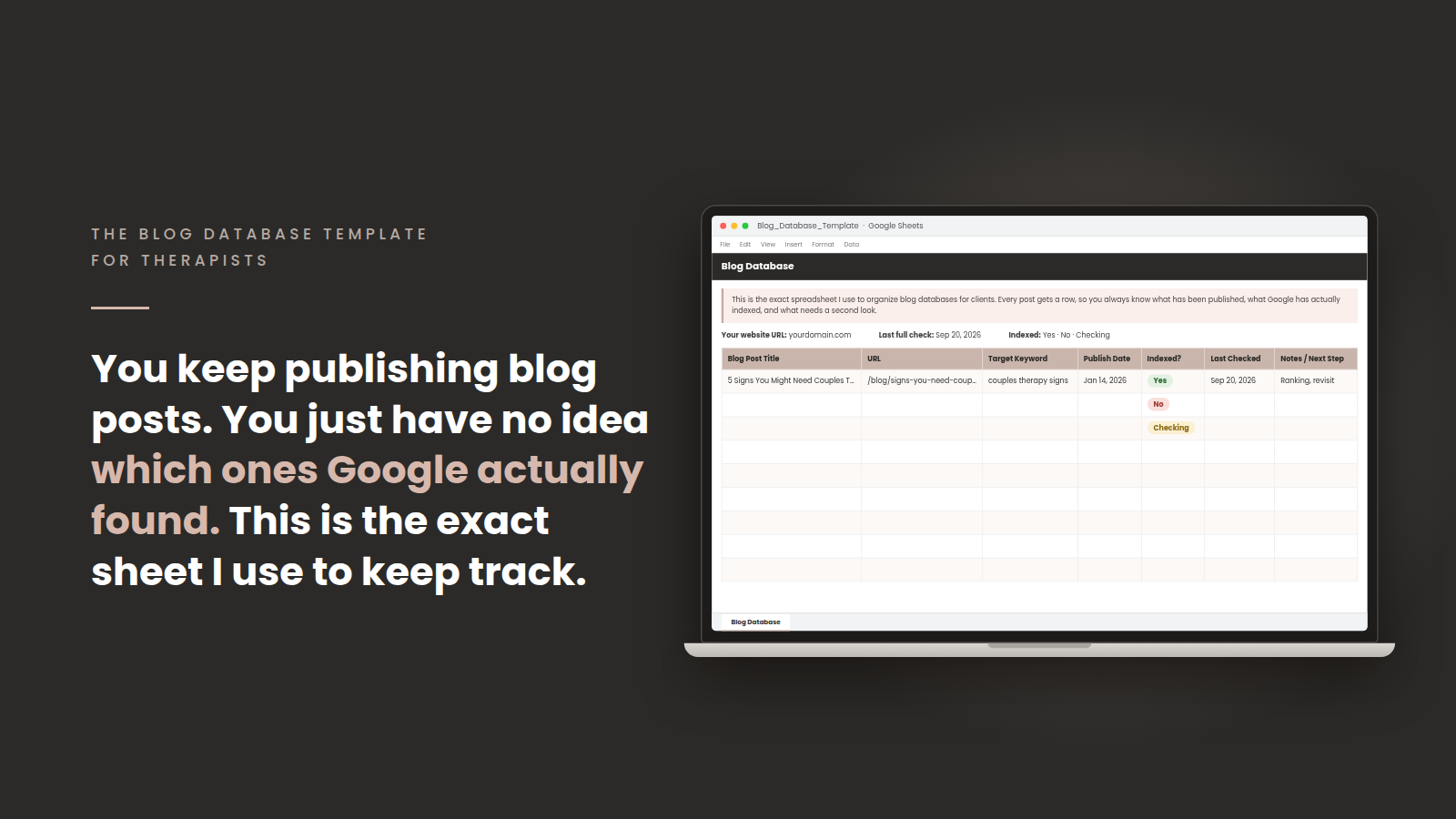
Get my free blog database and KPI template, add a tab for your prompt log, and you will have your prompts, your pages and your numbers in one file.
Why do AI answers change between runs and locations?
Because the same question can produce a different answer each time you ask it, and because search results are often shaped by where you are. One screenshot of one run is an anecdote, so run each prompt 3 times and write down how many of the 3 name you.
I have not found official documentation that explains exactly how each AI tool varies its answers, so I will not give you a mechanism. You can see the effect yourself in 2 minutes: ask the same prompt in a fresh chat twice and compare the lists. The method works whether or not you know why they differ.
Here is how I would keep the log clean:
- Use the same device, the same browser and the same signed in or signed out state each month, and write it in the notes column.
- Judge the trend over several months. One month going from 1 of 3 to 2 of 3 is a note.
How do I spot AI referral traffic in Google Analytics?
Look for sessions whose source contains chatgpt.com. OpenAI's publisher FAQ states that ChatGPT automatically includes the UTM parameter utm_source=chatgpt.com in referral URLs, so clicks from ChatGPT search results can be analyzed in your analytics.
In Google Analytics, Google's help page on traffic source dimensions says session source information appears in the Traffic acquisition report. Open that report, find your session sources and look for chatgpt.com. Then check the landing pages those visitors reached.
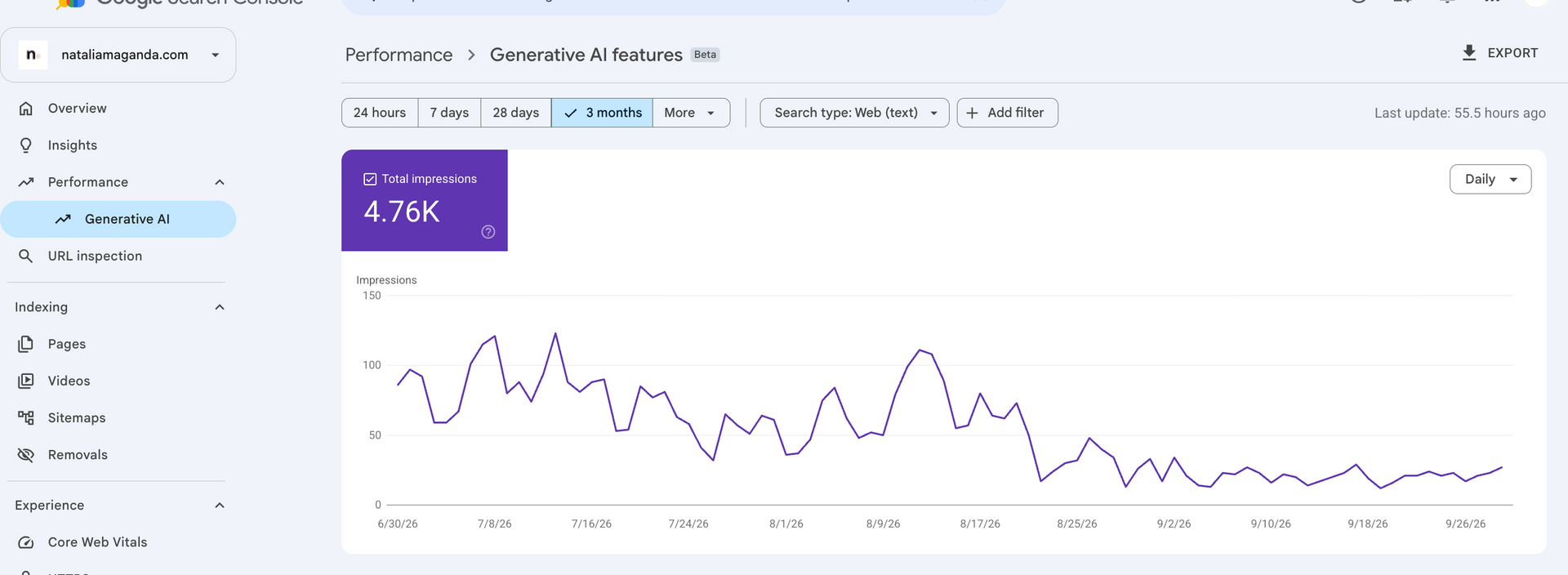
Google search console know has generative AI traffic impression reports, so you can see which of your URLS are being shown in AI overviews as you would for your regular search traffic.
I also like adding one question to a website contact form: "How did you find me?" with ChatGPT or another AI tool as an option. It catches what analytics cannot.
What can Search Console show about AI Overviews, and what can it not?
Search Console includes AI Overviews and AI Mode traffic in your overall search numbers. Google's AI features documentation says sites appearing in AI features are included in the overall search traffic in Search Console, reported under the Web search type in the Performance report.
What the Performance report does give you is clear definitions. According to Google's Performance report help, clicks are the number of times a user clicked through to your site from Google Search results, impressions are how many times your site appeared in search results, and click through rate is clicks divided by impressions. Those are the numbers I would build your monthly review on.
The same documentation says a page needs to be indexed and eligible to be shown in Google Search with a snippet to appear as a supporting link in AI features. I cover eligibility separately, so I will not repeat it here.
Which numbers should I watch to know if it is working?
Watch impressions, clicks, click through rate and leads, and reassess your strategy every 6 to 12 months. That is how I run it in the agency, because in my opinion, from building and managing sites, SEO is slow and results take months to show up. These 4 numbers move together, and the pattern says more than any single figure.
Here is how I read them:
| Number | Where you find it | What I look for |
|---|---|---|
| Impressions | Search Console | Rising impressions mean your pages are starting to get picked up |
| Clicks | Search Console | Clicks following impressions over the next months |
| Click through rate | Search Console | Whether your titles and descriptions earn the click |
| Leads | Contact form, calls, bookings | Inquiries that mention how they found you |
Impressions with no clicks yet is an early sign that your site is starting to get picked up, and it tells you to keep building. Sitting on page 6 means you are starting to appear. With little local competition a site could reach page one in the first 90 days, sometimes 6 months, and a bigger metro takes longer. That is my opinion from running this for clients, and your city decides your timeline.
Your prompt log is a fifth view. It is directional and hand collected, so I would never use it alone. When the log, your impressions and your leads all rise together, you can trust the story. When they disagree, believe leads first, because inquiries are what pay for the practice.
If you want a fuller look at reading these numbers, my post on how to tell if your therapy practice SEO is actually working walks through it.
Frequently asked questions
How often should I check ChatGPT for my therapy practice?
Once a month is enough. Run the same prompts 3 times each and compare to the previous log. Checking daily mostly captures the variation between runs.
Do I need a paid tool to track AI recommendations?
The manual log needs only a spreadsheet and about an hour a month. I have not tested paid AI tracking tools, so I cannot tell you how they compare. If you try one, check its numbers against your own log before you trust it. I am not in love of the idea of paying for AI visibility tools because the combinations of how people can find you are eternal, better to actually check your contact form submissions than to pay for an expensive SEO tool. First you need your traffic actually working before obsessing over analytics.
Can I see how many clicks came from AI Overviews in Search Console?
Google says AI features traffic is included in the overall search traffic in the Performance report, and the AI features documentation does not describe a separate AI Overview filter. For now we are able to view impressions only.
How many prompts should the log include?
I suggest 6 to 10, enough to cover your main specialties and cities and small enough to finish in an hour. If you want the bigger picture on how AI search fits with the rest of your SEO, my SEO guide for therapists, ChatGPT and AI authority is a good place to continue.
Want this off your plate?
Everything in this post can be done by you alone. A monthly log, an analytics check and a Search Console review are all doable, and they compete with your caseload, your family and your evenings.
If you would rather hand it over, I'm a website designer for therapists who also runs the SEO, so the pages, the tracking and the monthly review live with one person. My website management services keep your site updated and healthy after launch, and my SEO for therapists and SEO for private practices work covers the keyword, authority and reporting side, so you see impressions, clicks and leads without opening a spreadsheet.
If that sounds like relief, you can apply to work with me. No pressure, just a conversation about what would take the most weight off your desk.
* AI Disclosure: This content may contain sections generated with AI with the purpose of providing you with condensed helpful and relevant content, however all personal opinions are 100% human made as well as the blog post structure, outline and key takeaways.
* Affiliate Disclosure: Some of the links on www.nataliamaganda.com may contain affiliate links meaning that I will get a commission for recommending products at no extra cost to you.

hello! i'm natalia maganda
The website manager for therapists and private practices that you didn't know existed.
We build and manage the 20+ page website that ranks in your city, reflects the depth of your work and books cash-pay clients with ease.
A done for you website management system that lets your practice grow without costing you your energy, your weekends, or your nervous system.