
Is Your Therapy Website Eligible for AI Overviews and ChatGPT? 5 Checks
Your therapy website is eligible to show up in Google AI Overviews when a page is indexed and eligible to be shown in Google Search with a snippet. Google's AI features documentation lists no other requirement, and ChatGPT search adds 1 more gate, which is allowing OpenAI's search crawler to visit your site.
If we haven't crossed paths before, I'm Natalia, the founder of a boutique web design and SEO agency for therapists and private practice owners across the US. My mission is to help your website work as a 24/7 referral engine, so you can log off and still wake up to new inquiries. I have been in business for over 7 years, I have served 100+ clients, and I have managed over 900 URLs for other people's practices. Checking whether those URLs are actually indexed is a routine part of how I run SEO, so this is a process I use constantly.
Maybe you have read that you need special AI optimization, new files or extra markup, and you are wondering whether your site is already behind. Most of the work here is finding and removing blocks you may have added yourself. Here is the method, in the order I would check it.
Key takeaways
- A page needs to be indexed and snippet eligible to appear as a supporting link in AI Overviews, according to Google's documentation.
- Google says there are no additional requirements and no special optimizations for AI features, so nothing here promises a boost.
- A page can be quietly blocked by 4 settings: noindex, nosnippet, data-nosnippet and max-snippet.
- Search Console's URL Inspection tool and Page indexing report show you which of your pages Google has indexed.
- An unindexed page cannot be cited in Google's AI features, because it is missing from the index those features draw on.
- A consistent practice name, license and location across your site and listings helps your practice read as one clear entity.
What does eligible for AI Overviews mean?
Eligible means the page can be shown in Google Search with a snippet. Google's wording is that a page must be indexed and eligible to be shown in Google Search with a snippet to be a supporting link in AI Overviews or AI Mode. The same documentation says there are no additional technical requirements and no special schema.org structured data you need to add.
These fixes clear away what could keep a page out. Google lists indexing and snippet eligibility as the only requirements for appearing as a supporting link, and the documentation promises no place in any answer.
The baseline sits in Google's basic technical requirements. Googlebot has to be allowed to crawl the page, the page has to return a 200 success status, and the page has to contain indexable text that does not violate spam policies. Google notes that indexing is not guaranteed even for a page that meets them.
Which settings quietly block my therapy website pages?
These 4 settings control whether a page appears and how much of it can be shown. Google documents each one on its robots meta tag page, and Google's AI features page names these same 4 as the controls that limit what appears in AI features.
| Setting | What it does | Where it hides |
|---|---|---|
| noindex | Tells Google to keep the page out of search results | A site wide privacy toggle left on after a launch, or a page setting on a draft that went live |
| nosnippet | Tells Google to show no text snippet or video preview for the page | An SEO or visibility setting on the page, or a plugin option |
| data-nosnippet | An attribute on a span, div or section that excludes that block of text from snippets | A custom code block, often added to protect one paragraph |
| max-snippet | Sets a character limit for snippets, and a value of 0 equals nosnippet | A header or meta tag set by a developer years ago |
Only 2 details matter. First, the same rules can be delivered as an HTTP header as well as a tag in the page, so a page can look clean in the editor and still carry a rule. Second, if robots.txt disallows crawling a page, Google never sees the page's meta rules, and the robots meta tag documentation says those rules are ignored in that case. A blocked page needs its robots.txt rule fixed first.
In my opinion the most common cause is a setting somebody flipped during the build and forgot. A site gets hidden while it is under construction, launches, and the hiding stays on.
How do I check whether my pages are indexed in Search Console?
Use 2 tools, 1 for a single page and 1 for the whole site. Both live in Google Search Console and cost nothing.
URL Inspection for a single page
Paste a page address into the search bar at the top of Search Console. The URL Inspection tool reports "URL is on Google" or "URL is not on Google," and the page indexing section shows the last crawl, any robots.txt block, whether a noindex rule applies, and the canonical page Google selected. Google adds that "URL is on Google" does not guarantee the page will appear in search results. You can also run a live test to see how Google fetches the page, and request indexing after you fix a problem.
The page indexing report for the whole site
Open Indexing, then Pages. The Page indexing report shows indexed pages in green and non indexed pages in gray with a reason. The 3 reasons to watch are "URL marked noindex," "Crawled, currently not indexed" and "Discovered, currently not indexed." The sitemap filter above the chart lets you compare your submitted pages against everything Google found, so you can see which of the pages you planned are missing.
Start with your 2 main service pages, your specialty pages, your About page and your contact page, and check blog posts last.
Why does an unindexed page miss Google's AI features?
Google's documentation names indexing as a requirement for appearing as a supporting link in its AI features. A page missing from the index is missing from what those features can link to. That makes the Page indexing report the most important screen for Google's AI features, because every other improvement depends on the page being there.
If you want your key pages indexed, the best starting point is your sitemap, meaning the list of pages your site needs and the main phrase each one targets. I made a free sitemap spreadsheet planner for exactly this.
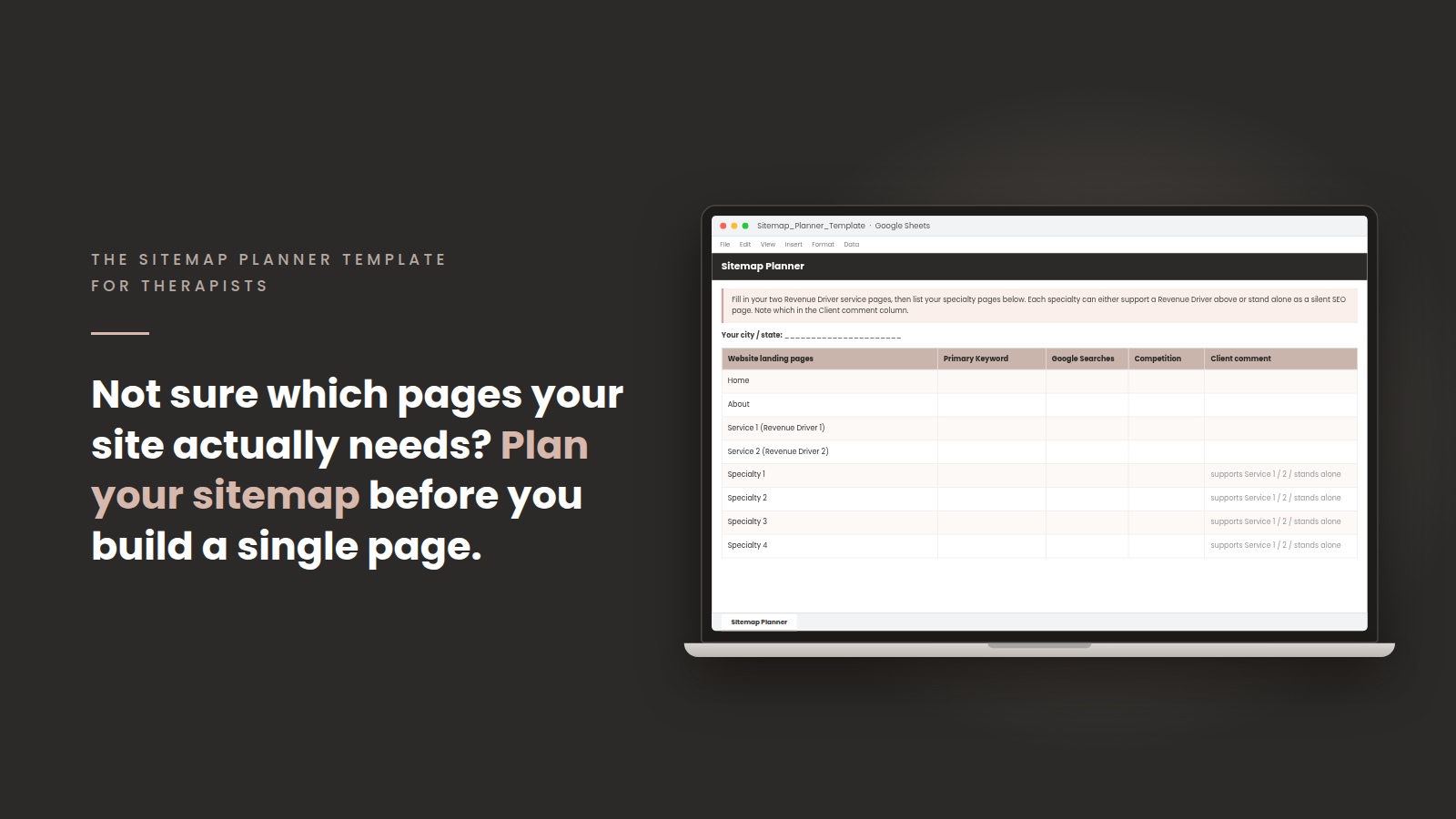
Get my free sitemap spreadsheet planner, list every page you have, and compare it against what Search Console says is indexed.
Can AI tools read what is on my therapy website?
They can read it when the content is plain text in your page, and each of the items below has a short answer. I am staying with Google's documentation here, because I have not run my own AI tests and will not invent results.
- Text inside images. Google's image guidance recommends standard HTML image elements and says the most important attribute for image metadata is alt text. Put your important sentences in real page text and describe each image in alt text.
- Tabs and accordions. Under mobile first indexing, Google uses the mobile version of your content. Google says you can move content into accordions or tabs on mobile as long as the content is equivalent to the desktop site.
- PDFs. Google lists PDF among the file types it can index. A PDF freebie can be indexed. Put your service explanations on pages of your site.
- Scripts. Google's JavaScript guidance says content loaded by scripts can be indexed after rendering, and it recommends server side or pre rendering because that makes a site faster for users and crawlers. Links should be standard a elements with an href attribute.
- Page speed and mobile. Google says Core Web Vitals are used by its ranking systems and also says good scores do not guarantee a top ranking. Treat speed as a quality check on your site.
I build every agency site on Duda, and that is my own platform opinion. Schema markup, the robots file, image compression and alt text generate automatically there, so fewer of these items land on your plate. My schema markup guide for therapist websites covers that part in detail, and Google's own documentation says no special schema is required for AI features.
Does my practice read as one clear entity?
It does when your practice name, license and location say the same thing everywhere a reader or a machine might look. Google's AI features documentation also tells site owners to keep their Business Profile information up to date, which is the first place to line things up.
Here is the check I would run. Write down your exact practice name, your license type and your city and state as they appear on your homepage. Then compare them against your About page, your footer, your Google Business Profile, Psychology Today and every other directory listing. An abbreviation in one place and a full name in another makes you look like 2 practices. My guide to NAP consistency for a therapy practice walks through the name, address and phone version, and my Google Business Profile guide for therapists covers the profile itself. A service based practice can hide its address, so keep the service area identical wherever it appears.
I cannot cite a primary source showing that AI tools reward consistency, so I offer it as good practice and make no promise about outcomes.
Does ChatGPT follow the same eligibility rules?
ChatGPT has its own gate. OpenAI's crawler documentation says OAI-SearchBot surfaces websites in ChatGPT's search features, and that sites opted out of OAI-SearchBot will not be shown in ChatGPT search answers. Allowing it happens in your robots.txt file, and OpenAI says changes take about 24 hours to take effect in its systems.
The same page describes GPTBot as the crawler for training foundation models and ChatGPT-User as the bot for actions a person triggers inside ChatGPT. Each of the 3 bots has its own robots.txt rule. I could not find a primary source stating which search index ChatGPT draws on, so I am leaving that question open. Open your own robots.txt at yourdomain.com/robots.txt and read it with these 3 names in mind.
In what order should I fix all of this?
Fix them in the order that gives you the most for the least effort. My ranking criteria are how many pages a mistake affects and how often I see it go unnoticed.
- Confirm your key pages are indexed in Search Console, since everything else depends on it.
- Remove any noindex, nosnippet or max snippet rule from pages you want shown.
- Check robots.txt for accidental blocks, including the OpenAI search crawler.
- Make sure your important text is real page text, with alt text on images.
- Line up your practice name, license and location across your site and listings.
Frequently asked questions
Do I need an llms.txt file or special markup to appear in AI Overviews?
Google's documentation says you do not need to create new machine readable files, AI text files or markup to appear in AI Overviews or AI Mode, and no special schema.org structured data is needed. On llms.txt specifically, John Mueller wrote in a June 17, 2025 Bluesky post: "FWIW no AI system currently uses llms.txt."
How do I know if my therapy website is indexed on Google?
Paste a page address into the URL Inspection tool in Search Console and read whether it says "URL is on Google." For the full picture, open the Page indexing report and review the gray reasons.
How long does it take after I fix a block?
Google's URL Inspection help says indexing typically takes a day or so after you request it and can take much longer. OpenAI's bots documentation says robots.txt changes take about 24 hours to take effect in its systems.
Want this off your plate?
Everything in this post can be done on your own, and it competes with your caseload, your family and the hours you have left. Checking indexing, reading headers and comparing listings is real work that keeps coming back.
As a therapist website designer who also runs the SEO, I build sites where the technical settings are handled from the start. Ongoing website management keeps those settings from drifting after launch, and my SEO for therapists and SEO for private practices work covers the indexing checks and the ongoing tracking. If you would like to apply to work with me, it is just a conversation about what would take the most weight off your desk.
* AI Disclosure: This content may contain sections generated with AI with the purpose of providing you with condensed helpful and relevant content, however all personal opinions are 100% human made as well as the blog post structure, outline and key takeaways.
* Affiliate Disclosure: Some of the links on www.nataliamaganda.com may contain affiliate links meaning that I will get a commission for recommending products at no extra cost to you.

hello! i'm natalia maganda
The website manager for therapists and private practices that you didn't know existed.
We build and manage the 20+ page website that ranks in your city, reflects the depth of your work and books cash-pay clients with ease.
A done for you website management system that lets your practice grow without costing you your energy, your weekends, or your nervous system.